
Why I Built Spotlight for AI
AI is becoming less of a place I occasionally visit and more of a regular part of daily work. I reach for it while coding, researching, writing, and handling the smaller questions between those tasks. The more often I use it, the less sense it makes to treat it as a separate destination.
Quiper is my attempt to make AI feel more like Spotlight. Press one global shortcut—⌥ Space by default—and it appears over the application I am already using. Ask the question, copy what I need, and dismiss it with the same shortcut or ⌘Q. The latter closes the overlay while Quiper continues running in the menu bar, ready for the next shortcut. It restores focus to the previous application without rearranging the workspace.
Without that, even a small question can begin with finding the right browser window, locating the right tab, and remembering which conversation belongs to the task in front of me. Each step is trivial. Repeated throughout the day, they turn quick interactions into context switches and pull attention away from the work that prompted them.
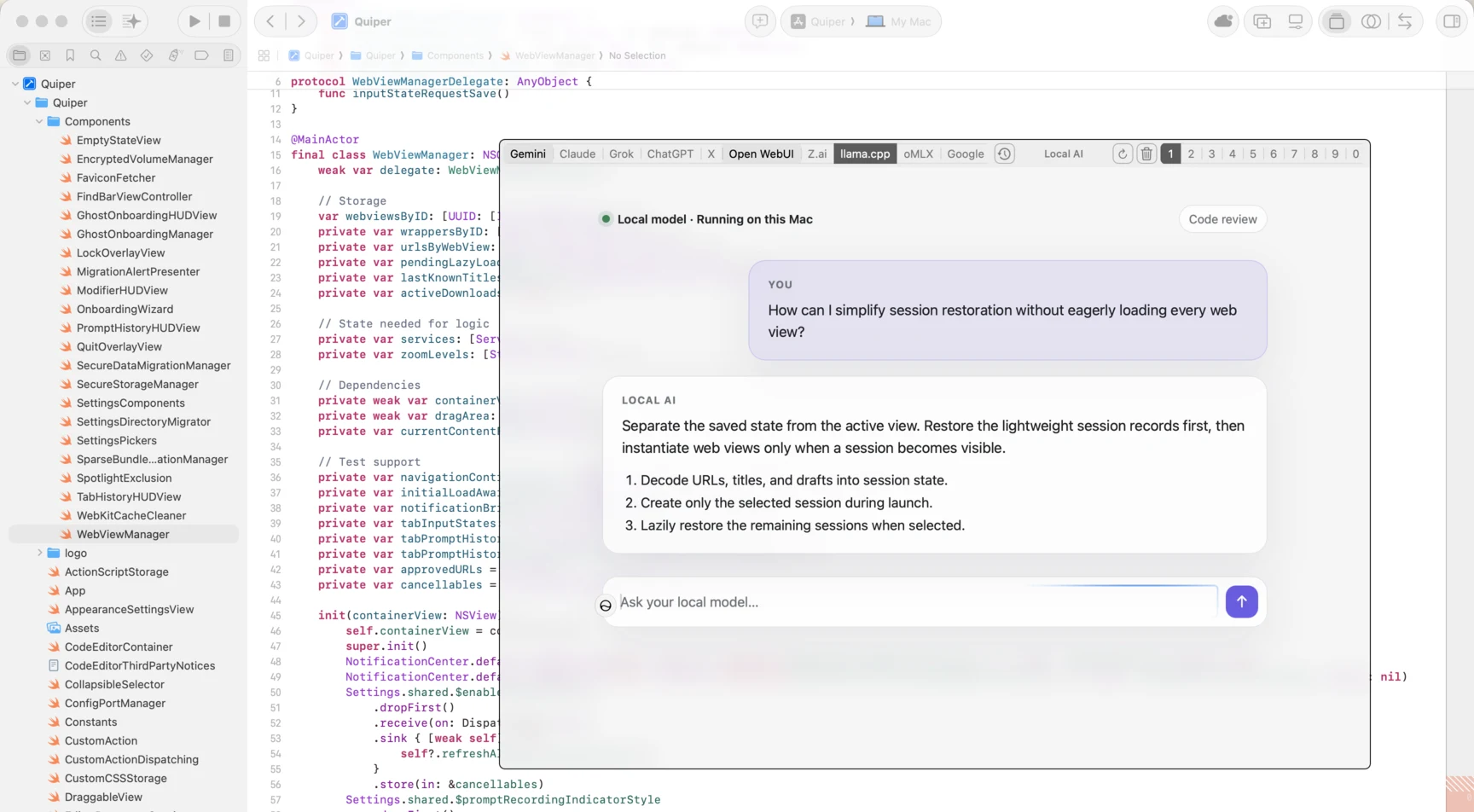
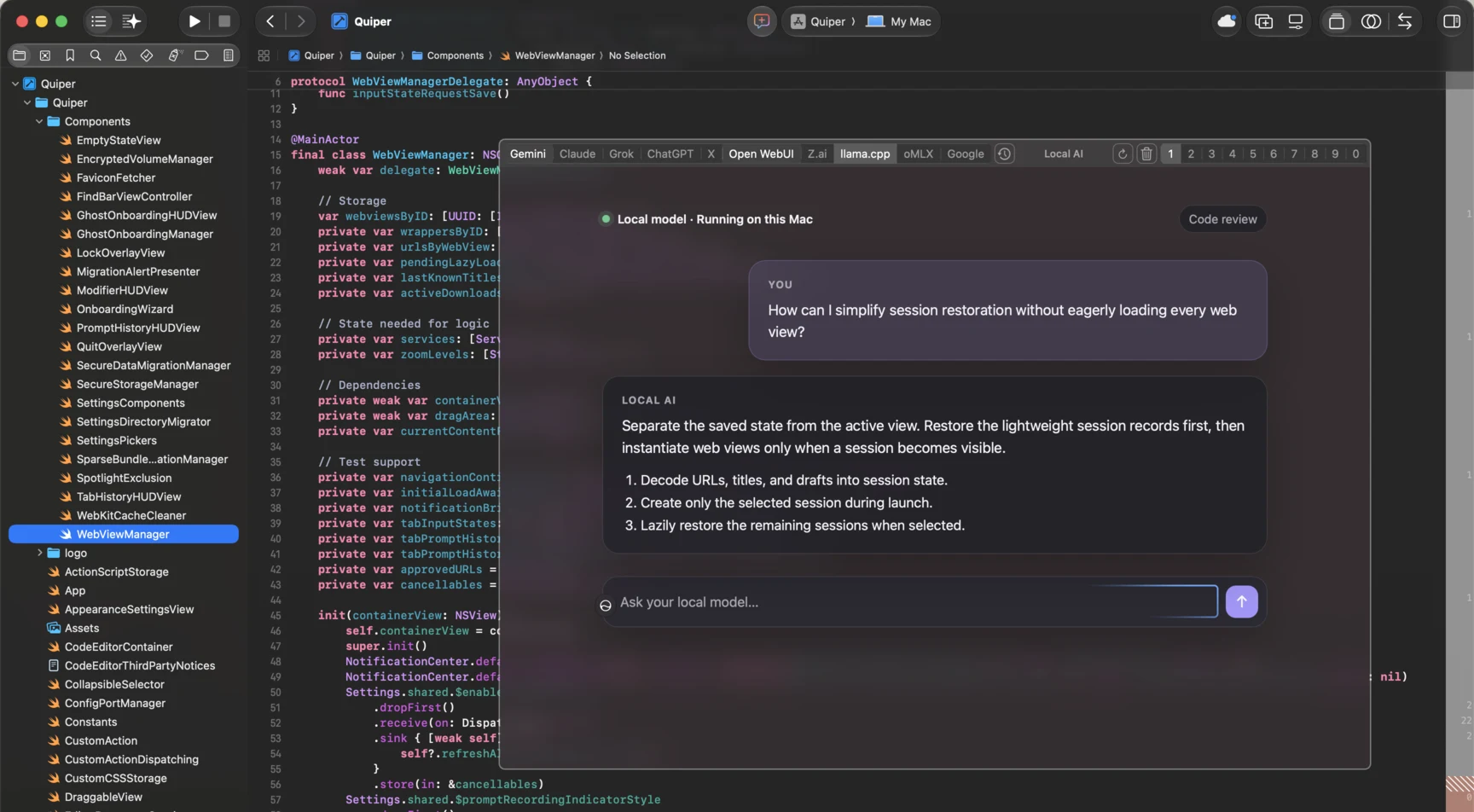
Quiper opens above the current workspace, then gets out of the way without changing that workspace.
Sessions should follow the work
A single AI conversation is rarely enough. A coding thread accumulates repository context. Research collects sources and dead ends. Writing benefits from a separate editorial conversation. Personal questions should not be mixed into any of them.
Quiper gives each configured engine up to ten independent session slots. I can leave those conversations attached to their tasks and switch directly with the keyboard instead of searching through a provider's history each time. The open tabs and their pages can be restored when Quiper starts again, so closing the overlay does not mean abandoning the thread.
The same model applies across engines. Quiper includes templates for services such as ChatGPT, Claude, Gemini, and Grok, but an engine is fundamentally a name, a URL, and a small amount of integration configuration. That makes room for other web-based providers as well as local interfaces such as Open WebUI and llama.cpp. Cloud and local tools can live in the same switcher without pretending they are the same model or forcing them through a common API.
Their interfaces remain their own. I am not trying to make Gemini look like Claude, or a local llama.cpp frontend look like ChatGPT. I am trying to make the experience around those interfaces consistent: the same intent should be available through the same command, even when each service implements it differently.
Quiper's five default custom actions are a small example. ⌘N starts a new session. ⌘⇧N starts a temporary or private session when the engine supports one. ⌘⇧S shares the active thread, ⌘⇧H opens its history, and ⌘, opens the active engine's settings. Behind each shortcut is an engine-specific script because the underlying pages do not share a common DOM structure or API. Those scripts can be adjusted or replaced, but the keyboard vocabulary stays familiar when I switch engines.
This matters because different tasks call for different tools. It also avoids turning the overlay itself into another AI platform. Quiper manages access and sessions; the provider still provides the service.
Why it is a native Mac app
Quiper is written in Swift and built with AppKit, SwiftUI, and the system WebKit framework. That choice is practical. A global overlay needs to cooperate with macOS window levels, Spaces, focus restoration, menu-bar behavior, global hotkeys, notifications, Keychain, and Touch ID. Those are operating-system concerns, not decorations around a web page.
An Electron application would bring another browser runtime to solve a problem already centered on web services. A browser extension would remain bounded by the browser and could not provide the same system-wide window and focus behavior over Xcode, a terminal, a writing app, or anything else on the Mac. Using native controls around WKWebView gives Quiper a focused shell while leaving each service's actual interface intact.
Native does not automatically mean fast, so the interaction model is deliberately keyboard-first. The global shortcut opens and closes the overlay. Number shortcuts jump to sessions or engines. Arrow-key bindings move between them, while find, reload, zoom, and user-defined actions remain available without reaching for the pointer. The point is not to collect shortcuts; it is to make the path from “I need to ask this” to the right existing conversation short and predictable.
Trust has to be inspectable
Quiper handles authenticated web sessions, so trust cannot depend on a privacy slogan. The application is open source and telemetry-free. Chat pages connect directly from their WebKit views to the providers or local engines configured by the user; Quiper does not proxy conversations through a Quiper service.
Stable release disk images are built by GitHub Actions from the public repository and published with GitHub artifact attestations. The provenance of a downloaded Quiper.dmg can be checked with the GitHub CLI rather than taken on faith:
gh attestation verify Quiper.dmg --repo sassanh/quiperFor local data that needs additional protection, Quiper can optionally place a selected engine's cookies, cache, local storage, and session data in encrypted APFS storage protected by Touch ID and the macOS Keychain. It is an opt-in local safeguard, not the center of the product.
That boundary is important. Quiper wraps web services; it does not replace them. When a prompt is sent to a cloud provider, that provider receives and stores the conversation according to its own policies. Quiper's encrypted local storage does not extend to a provider's servers, and Quiper cannot make a cloud conversation end-to-end encrypted.
A smaller interruption
Context matters to people, too. Just as an AI needs the right context to give a useful answer, we need to stay connected to the work that prompted the question. Hunting for the right app or tab breaks that connection, even if only for a moment.
Quiper does not try to change how AI services work. It changes how much of my own context I have to leave to reach them. The overlay, persistent task-specific sessions, provider switching, and native keyboard control all serve that narrower goal: make AI available when it is useful, then make it disappear.
Download the latest Quiper release, view the source on GitHub, or read the documentation.